My First Foray into Full-Stack with webforJ


As I went through my computer science education at Oregon State, I realized pretty quickly that I enjoyed the UI side of things. Messing around with CSS (yes, even trying to center a div) and making pages that looked nice appealed to me way more than databases and business logic.
Somehow, I ended up working at a company that primarily used Java. Lucky for me, the project I ended up on was a Java web framework - back in my comfort zone!
I've been able to keep myself pretty much in UI land since then, in my comfort zone and happy to let my colleagues deal with all that back end stuff.
Recently our framework, webforJ, released Spring integration, and with that, my blissful isolation in UI land came to an end. As my first foray into full-stack development, I was asked to build a (very, very simple) CRUD application using Spring and webforJ both so I could learn more about the back end, and also showcase webforJ and Spring together in one project.
TLDR: It went well.
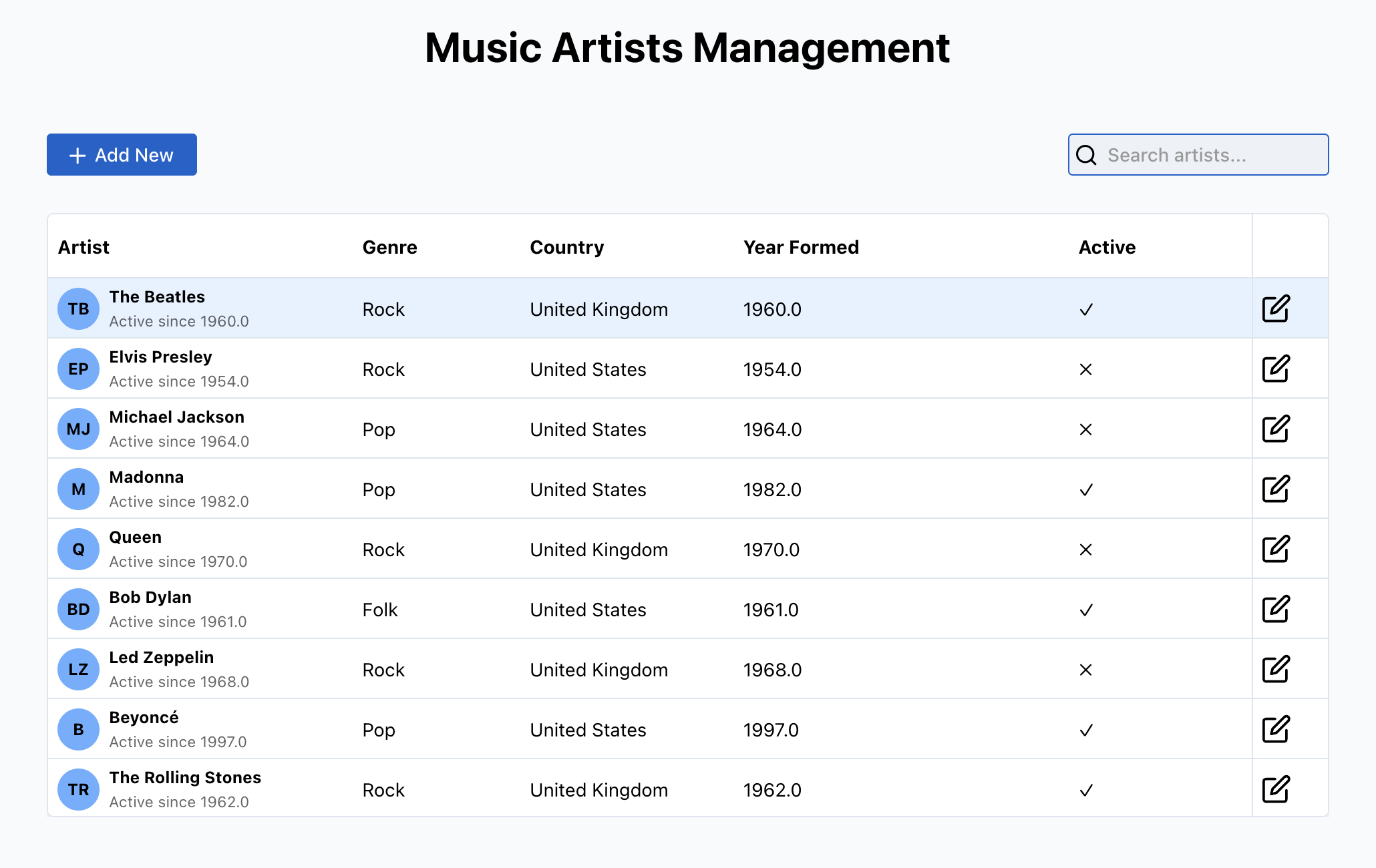
The Mission: A Music Artist Management System
The task seemed simple enough - build an app to manage music artists, fairly basic stuff:
- Show artists in a nice-looking table (I can do tables!)
- Let users add, edit, and delete artists using Spring
- Use webforJ's table filtering
- Make it look professional, but nothing over the top (finally, my territory!)
I started off watching a few tutorial videos, and started hearing things like "dependency injection" and "beans" thrown around. Thankfully, I remembered that I'm living in the AI age, and instead started to ask various chat models to help me learn more about Spring.
I'm happy to say, everything was straightforward - I managed to (fairly easily) build a simple CRUD app using Spring Boot and webforJ. For those curious about what I did and in what order, here's the process I followed:
The Back End
Creating my data layer took exactly three files. I've written CSS files longer than my entire backend. Of course, this is a simple app, but with the help of my AI buddy, I was able to not only get these files created, but finally understand the relationship between the different layers and components. My data model/entity defines the structure of my data and maps it to the database, my repository provides an interface for CRUD operations and database queries, and my service layer contains business logic and orchestrates communication between controllers and repositories.
File #1 - The Entity:
@Entity
public class MusicArtist {
  @Id
  @GeneratedValue(strategy = GenerationType.IDENTITY)
  private Long id;

  @NotBlank(message = "Artist name is required")
  private String name;

  private String genre;
  private Boolean isActive = true;
  // ... more fields
}
Learning about these annotations, and the work they're doing for me that I didn't have to inplement myself was pretty great. The model was also quite small, but I didn't mind learning via something simple to start.
File #2 - The Repository:
@Repository
public interface MusicArtistRepository extends JpaRepository<MusicArtist, Long> {
    // That's it. That's the whole file.
    // Spring writes all the CRUD operations for you.
}
When I realized this interface was complete and fully functional, that started to really show me how powerful Spring is.
File #3 - The Service (where you put your business logic):
@Service
public class MusicArtistService {
  @Autowired
  private MusicArtistRepository repository;

  public MusicArtist createArtist(MusicArtist artist) {
      if (artist.getIsActive() == null) { //Simple business logic/checks built around my CRUD operations
          artist.setIsActive(true);
      }

      return repository.save(artist);
  }

  public SpringDataRepository<MusicArtist, Long> getFilterableRepository() {
      return new SpringDataRepository<>(repository); //Simple method to make sure my Table can efficiently filter data
  }
}
And like that, I had a working backend. No SQL queries or complex steps to learn.
webforJ Integration
Now here's where I thought things might get a little more complex. In my experience, making two frameworks play nice usually involves adapter patterns, configuration nightmares, copious amounts of swearing, etc.
But this was all it took:
@Route("/artists")
public class MusicArtistsView extends Composite<FlexLayout> {

    private final MusicArtistService artistService;

    public MusicArtistsView(MusicArtistService artistService) {
        this.artistService = artistService;  // Spring just... provides this
        setupMyBeautifulUI();
    }
}
That's it. Spring automatically knew to provide my service to webforJ, and then I was back to what made sense to me - UI creation.
Making It Look Decent (My Happy Place)
With the scary backend stuff handled, I could focus on what I love - making things look good. And webforJ made this part genuinely fun.
Renderers
I wanted those trendy Gmail-style avatars with initials to display in my table. There are examples of other renderers on our docs page, but a simple renderer was quite easily accomplished. Here's how it works:
public class ArtistAvatarRenderer extends Renderer<MusicArtist> {
  @Override
  public String build() {
    return /* html */"""
      <%
      const artist = cell.value;
      const name = cell.row.getValue("Name");
      const yearFormed = cell.row.getValue("Year Formed");
      const isActive = cell.row.getValue("Active");
      const initials = name ? name.split(' ').map(word => word.charAt(0)).join('').substring(0, 2).toUpperCase() : '?';
      const yearText = yearFormed ? (isActive ? 'Active since ' + yearFormed : 'Formed in ' + yearFormed) : 'Status unknown';
      %>

      <div part='artist-avatar-renderer'>
          <div part='artist-avatar'>
              <%= initials %>
          </div>
          <div part='artist-text'>
              <div part='artist-name'><%= name %></div>
              <div part='artist-year'><%= yearText %></div>
          </div>
      </div>
      """;
  }
}
My Table went from "database dump" to looking like it was built with more intention quite easily. I've spent way too much time with Table renderers, and have been quite enjoying building some cool-looking things with them, like this dashboard project I completed a little while ago.
Binding the back end to my form
The other thing that took me by surprise was using webforJ's automatic data binding to keep my model and my UI in sync. I remembered a small project in college I'd done, and remembered that getting info from the UI and setting my model's info to match had been a mess of getter and setter calls.
While data binding is by no means a revolutionary invention, using webforJ's automatic data binding was a one liner that let be both bind my data and automatically apply Jakarta validation rules (set in my model) to the UI fields.
// This one line handles ALL the form binding
BindingContext.of(this, MusicArtist.class, true);
One line. Truly, I spent more time choosing the button themes than setting up data binding.
Wrapping up
All in all, my first foray into the Spring world and coupling it with webforJ ended up being way more straightforward and stress free than I'd originally thought.
Both Spring Boot and webforJ seem designed by people who've had to deal with complicated frameworks before. Everything has sensible defaults. A lot of the work I expected to do was done for me. The documentation has real examples.
The Reality Check
Of course, it wasn't all rainbows and auto-configuration. Here's what tripped me up:
The Bean Mystery of Day 1: I spent more time than I should have wondering why my service was null. Started with @Autowired on a field and tried using it in my constructor. The service wasn't injected yet - so I added @PostConstruct to initialize things after Spring injection. It worked, but then someone showed me I could just use constructor injection instead. One simple change from field injection to constructor parameter, and suddenly everything worked without the lifecycle issues. Sometimes the simplest solution is the right one.
The Disappearing Table: My table wouldn't show up. Why? Because I forgot to set a height. The Table component needs dimensions, weirdly enough :)
The Verdict
The term "full-stack" has always intimidated me a bit, mostly because I gravitated so heavily towards the front end, and neglected learning as much as I should have about the rest of the stack. But here's the thing: building this little web app in Java with Spring Boot and webforJ felt just as straightforward as using one of the big names in web development.
I spent most of my time:
- Writing the code I actually needed (not boilerplate)
- Leveraging the framework's ability to do the right things by default
- Spending time on development instead of configuration
- Actually enjoying full-stack development, and learning about it, too!
For developers who want to build full-stack applications, especially those of you coming from or living in the Java world, this combination is worth trying. You might surprise yourself!
Get the Source Code
Want to explore the complete application? The full source code for this Music Artist Management System is available on GitHub:
🔗 View the source code on GitHub
Feel free to clone it, play around with it, and see how webforJ and Spring Boot work together in action!
Building something with webforJ?
Talk to the team about your project, a migration, or whether webforJ fits.
Keep reading
 Building a Full-Featured Demo with webforJ and Spring BootA walkthrough of the webforJ Bookstore app, a full-stack inventory manager with live filtering, data binding, custom table renderers, and Spring Security
 Your Spring Boot app doesn't need a REST API for the UIWhen the frontend and backend are both Java, the REST layer between them is optional overhead — and naming what disappears makes the tradeoff concrete.
 Loading Data from REST APIs in webforJLearn when to use different webforJ Repository types for optimally loading data